In short
A thermal camera sees heat, and on a solar system heat in the wrong place is the early sign of a fault. A scan can pick up a failing cell, a dead section of a panel, a hot plug or an overheating rooftop switch while the system still looks fine from the ground. Some damage shows straight away and some develops over months, so after a storm a second scan later, compared with the first, shows anything that has changed. It's worth doing if your production has dropped, the system has been through a storm, or nobody has checked it for a few years.
Many solar faults are quiet. Nothing trips. The inverter light stays green. The app still shows a curve every day. You just make a bit less power than you used to, and you pay for the difference on a bill you weren’t watching closely.
By the time a fault is obvious, it has usually been there a while. A thermal scan is a way of finding it early, while the fix is still small.
This post is what a scan looks for, what it means for you, where its limits are, and when you can skip it.
The playbook
- Know what heat means. A healthy array is evenly warm. A fault is a hot patch.
- Know the four things a scan finds. A struggling cell, a dead strip, a hot connection, a hot switch or breaker.
- Scan twice after a storm. Once now, once a few months on, and compare.
- Pick the right time. Strong, steady sun. Not a cloudy afternoon.
- Use the result. A picture and a plain answer: fix it, claim it, watch it, or leave it.
What a thermal camera sees
A solar panel turns sunlight into electricity, and most of what it can’t turn into electricity becomes heat. When every cell is doing its share, the whole panel sits at about the same temperature.
When one part stops pulling its weight, the energy has to go somewhere, and it goes into heat. So the camera isn’t looking for hot panels. It is looking for one part that is hotter than the parts beside it.
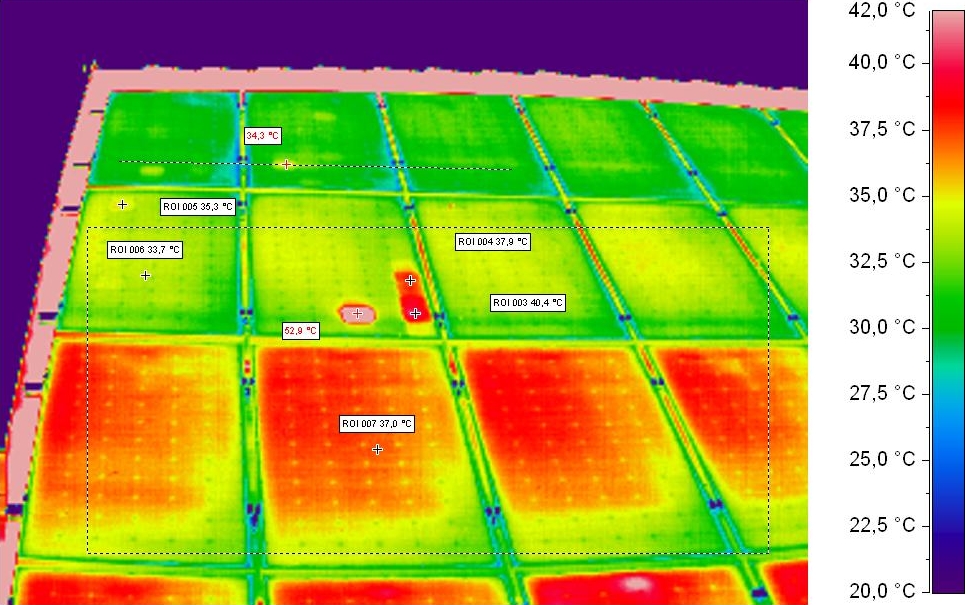
The picture at the top of this post is a real thermal scan of a solar array. The small red and white patches on one panel in the middle row are what the photographer describes as a faulty cell, standing out against the even colour of the cells around them.
That’s the whole idea. We don’t need you to read the picture. We need the picture to tell us where to put a meter.
The four things we look for
a) A hot cell. One square on a panel glowing brighter than the rest. Common causes are a damaged cell, a manufacturing flaw, or something as simple as a bird dropping or a leaf shading that one spot day after day. A hot cell left alone can damage the panel over time.
b) A warm strip. A panel is wired in sections, each protected by a small part called a bypass diode. When one fails, a strip of the panel can stop producing or run warm. You lose part of that panel’s output and nothing on the ground tells you.
c) A hot connection. The plugs that join panels together, and the cable joints behind them, should be no warmer than the cable. A plug that is loose, corroded or was never clicked home properly runs hot. This is the one we most want to catch early, because a hot connection is a fire risk.
d) A hot switch or breaker. The same camera pointed at the rooftop switch, the inverter and the box with all your circuit breakers in it shows any connection that is running hot. Water can get into rooftop switches over the years.
After a storm: scan now, scan again later
Storm and hail damage doesn’t all show on the first day. Some of it is obvious straight away. Some develops. SolarQuotes notes in its guide to hail and solar panels that small cracks in cells “can grow over time”, cutting a panel’s output and creating hot spots as they do.
That is why time is part of the job, not only the camera.
a) A scan soon after the storm. This finds the damage that is already affecting the system, and it gives you a dated record of how every panel looked.
b) A second scan a few months on. Set beside the first, it shows any panel that has changed. A panel that was even in the first scan and has a hot patch in the second has changed since the storm, and that is the panel we test to find out why.
c) Your production in between. Your monitoring app is watching the whole time. A drop between scans is a reason to bring the second one forward.
If you need to make an insurance claim later, two dated scans and the production record between them help show what changed and roughly when. We cover the rest of a storm assessment in our post on storm damage.
When a scan is valid
A scan on the wrong day is worse than no scan, because it gives you false comfort.
a) Strong sun. The panels need to be producing well for faults to show.
b) Steady conditions. We want settled weather, so what the camera shows is the system and not the passing cloud.
c) The system running. A system that is switched off shows nothing useful.
If the day turns out wrong, we’d sooner come back than hand you a report that doesn’t mean much.
Who should get one
Yes, if your system is making noticeably less than it did in the same season last year and you can’t explain why.
Yes, if the system has been through a hailstorm, had a branch come down on it, or had water in the roof space.
Yes, if it has been a few years since anyone qualified looked at it. That applies to homes, and even more to businesses, where a larger array means more plugs, more cable and more money riding on it.
Yes, if you’re buying a property with solar already on the roof and want to know what you’re getting.
One thing to note: a scan answers “is something running hot, and where”. We pair it with electrical tests, which confirm the system is safe.
What it costs
After a scan you get a written report: the thermal pictures, what each one means in plain English, and a recommended course of action. We quote this job by job, because it depends on the size of the system, how the roof can be reached and whether you want the electrical tests done on the same visit. Ask us and we typically give you a price before we come out.
What we can say is where the value sits. A hot plug found early is a small repair. The same plug found late is a bigger job.
When not to bother
- The system is new and performing. If it was installed in the last year or two and production matches what you were told to expect, there’s nothing to chase.
- The drop has an obvious cause. A tree that has grown, a new antenna, a dirty array after a long dry spell. Fix the shade or wash the panels first and see what comes back.
- The inverter is already showing a fault code. That needs an electrician with a meter first. A camera comes second, if at all.
What to do next
Look at your monitoring app and compare this month with the same month last year. If it’s down by more than the weather explains, or you can’t remember the last time anyone checked the system, get in touch and tell us what you’ve noticed. We can talk through whether a scan is worth it for your system or whether there’s a simpler first step.
Top image: "Photovoltaik", a thermal scan of a solar array showing a faulty cell, by Bauthermografie & Luftdichtheitsprüfung Lutz Weidner, from Wikimedia Commons, licensed CC BY-SA 3.0. Shown unaltered apart from cropping to fit the page. It is not a High Energy job.
